Example 1 - Modelling a Duotransit
Let’s walk through how to model a duotransit with MonoTools.
First, some imports:
[2]:
from MonoTools.MonoTools import fit,tools,starpars,lightcurve

import pandas as pd
import numpy as np
import matplotlib.pyplot as plt
%matplotlib inline
E1 - Loading the lightcurve
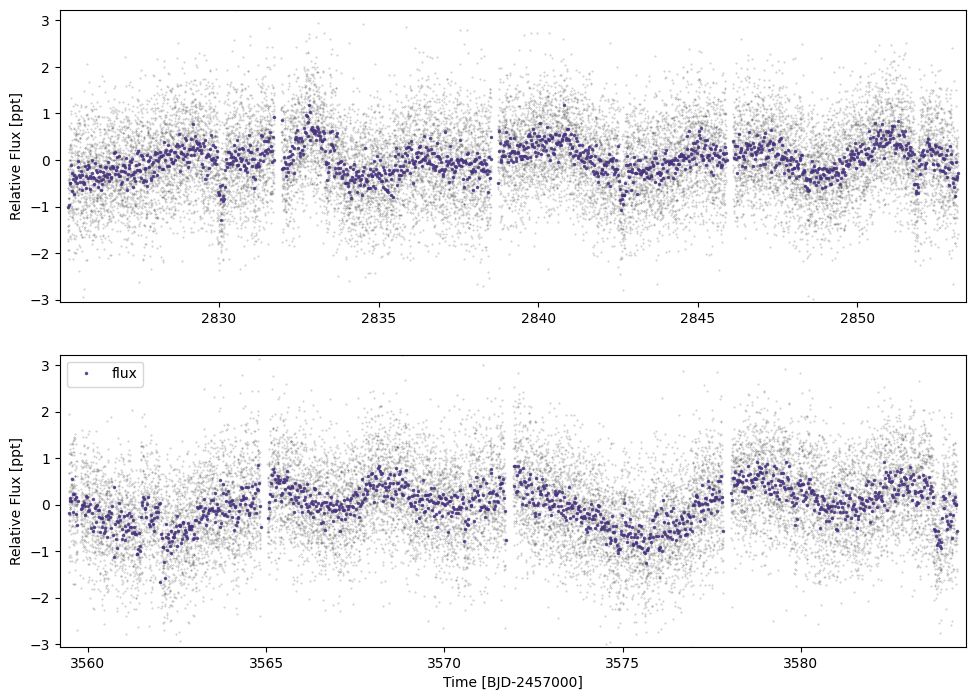
Let’s download the target lightcurve using the attached lightcurve module.
use_fast=False means we do not download the 20s cadence data, which slows down the modelling!
We can then plot the lightcurve using lc.plot() (here we don’t need to save the plot)
[6]:
tic=431810418
lc=lightcurve.multilc(tic,'tess',save=False,load=False,use_fast=False)
lc.plot(savepng=False,savepdf=False)
Getting all IDs
Accessing online catalogues to match ID to RA/Dec (may be slow) mission= tess
92 91
Sector 92 not (yet) found on MAST | RESPONCE:404
None
[ ]:
ticalc=lightcurve.lc()
sect=83
t=np.hstack([pd.read_csv(f,index_col=0)['time'].values for f in glob.glob("/Users/hugh/Postdoc/Cheops/TICA_lightcurves/TIC"+str(tic)+"_TICA_S*_lc.csv")])
f=np.hstack([1000*(pd.read_csv(f,index_col=0)['flux_ap_1.5'].values/np.nanmedian(pd.read_csv(f,index_col=0)['flux_ap_1.5'])-1) for f in glob.glob("/Users/hugh/Postdoc/Cheops/TICA_lightcurves/TIC"+str(tic)+"_TICA_S*_lc.csv")])
rawf=np.hstack([1000*(pd.read_csv(f,index_col=0)['raw_flux'].values/np.nanmedian(pd.read_csv(f,index_col=0)['raw_flux'])-1) for f in glob.glob("/Users/hugh/Postdoc/Cheops/TICA_lightcurves/TIC"+str(tic)+"_TICA_S*_lc.csv")])
bgf=np.hstack([pd.read_csv(f,index_col=0)['bg_flux'].values for f in glob.glob("/Users/hugh/Postdoc/Cheops/TICA_lightcurves/TIC"+str(tic)+"_TICA_S*_lc.csv")])
ferr=np.hstack([1000*(np.sqrt(pd.read_csv(f,index_col=0)['flux_err'].values)/pd.read_csv(f,index_col=0)['flux_ap_1.5'].values) for f in glob.glob("/Users/hugh/Postdoc/Cheops/TICA_lightcurves/TIC"+str(tic)+"_TICA_S*_lc.csv")])
ticalc.load_lc(time=np.sort(t),
              fluxes={'flux':f[np.argsort(t)],
                      'raw_flux':rawf[np.argsort(t)],
                      'bg_flux':bgf[np.argsort(t)]},
              flux_errs={'flux_err':ferr},
              flx_system='ppt',src='tica',mission='tess',jd_base=2457000,sect=sect)
lc=lightcurve.multilc(tic,'tess',save=False,load=False,extralc=ticalc,priorities=['ts_20_pdc','ts_120_pdc','ts_200_tica'])
lc.plot(savepng=False,savepdf=False)
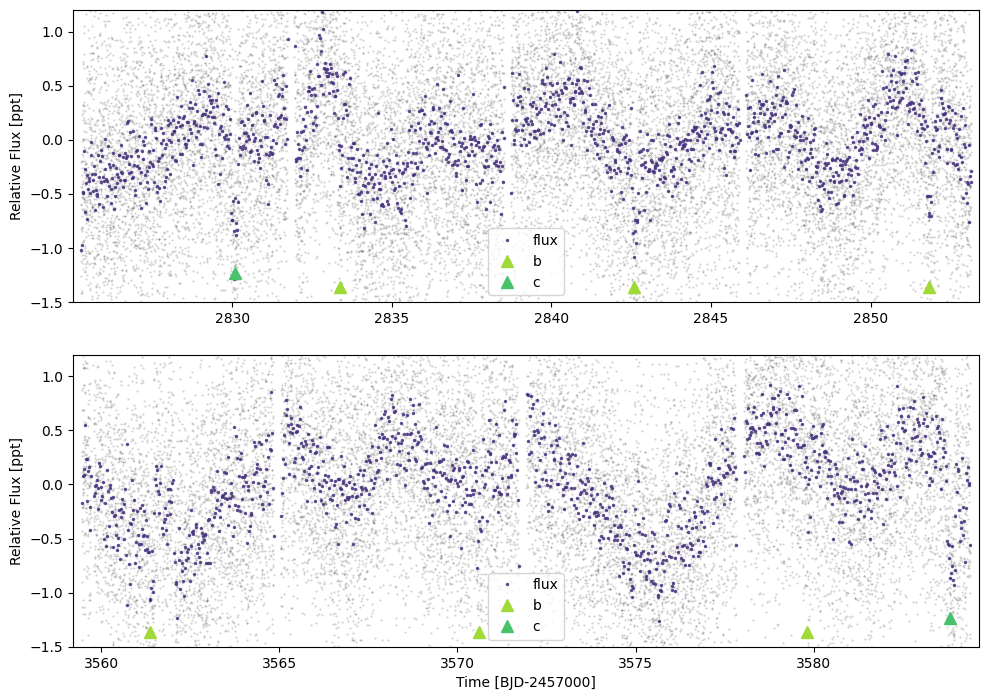
E1 - Plotting the transit positions
By passing a dictionary of dicts to plot_ephem. We also constrain y-axis using ylim:
[8]:
ephs={'b':{'p':(3570.6-2842.6)/np.round((3570.6-2842.6)/(2851.85-2842.6)),'t0':2842.6,'dur':0.18},
      'c':{'p':(3583.82-2830.1),'t0':3583.82,'dur':0.24}}#Here we just use the transit span as p
lc.plot(plot_ephem=ephs, timeseries=['flux'], ylim=(-1.5,1.2), savepng=False, savepdf=False)
E1 - Initialising the model with a duotransit and multiplanet
The initial fit.monoModel class needs the TIC ID, the mission name, and the lightcurve itself.
Then we can add planets using add_multi and add_duo. These require dictionaries with the ephemeris and depth, as well as (crucially) the planet name.
init_starpars then either takes user-defined stellar parameters (e.g. Rstar=[Rs_med,Rs_neg_err,Rs_pos_err], and same for rhostar, Mstar, logg). In the default case, stellar parameters come from the TIC (v8) catalogue.
We can then initialise the lightcurve and the model
[10]:
mod=fit.monoModel(tic,'tess',lc=lc)
#mod.add_multi({'tcen':ephs['b']['t0'],'period':ephs['b']['p'],'tdur':ephs['b']['dur'],'depth':0.4e-3},'b')#,update_per=False)
mod.add_multi({'tcen':ephs['b']['t0'],'period':ephs['b']['p'],'tdur':ephs['b']['dur'],'depth':0.55e-3},'b')
mod.add_duo({'tcen':ephs['c']['t0'],'tcen_2':ephs['c']['t0']-ephs['c']['p'],'tdur':ephs['c']['dur'],'depth':0.7e-3},'c')
mod.init_starpars()
{'tcen': 3583.82, 'tcen_2': 2830.1, 'tdur': 0.24, 'depth': 0.0007, 'tcens': array([3583.82, 2830.1 ]), 'span': 753.7200000000003, 'period_int_aliases': array([ 1.,  2.,  3.,  4.,  5.,  6.,  7.,  8.,  9., 10., 11., 12., 13.,
       14., 15., 16., 17., 18., 19., 20., 21., 22., 23., 24., 25., 26.,
       27., 28., 29., 30.])}
E1 - Initialising the lightcurve without a GP
There are two main options - with or without a Gaussian Process.
Without a Gaussian Process (use_GP=False) will use a bspline-fitting method (masking the identified transits). This will be faster, but in cases with relatively high-amplitude noise/stellar activity close in duration to the transit, a GP will be more robust. In this case, we do not need all of the data, so we can cut the out-of-transit data, here to 2.5 transit durations from t0, using cut_distance=2.5.
In the case of use_GP=True, bin_oot=True allows for photometry far-from-transit to be binned in order to speed up computation time. Alternatively, bin_all=True will bin all the data including in-transit points. Alternatively fit_no_flatten=True will not perform any flattening and assume the lightcurve is already flat with out-of-transit flux at ~0.0.
[11]:
mod.init_lc(use_GP=False, cut_distance=2.5, bin_oot=False)
[2825.25645275 3559.42661067] [2853.1429363 3584.37965094]
E1 - Initialising the duotransit model
There are many options for model fitting:
constrain_LD=Truewill constrain the limb darkening coefficients to the theoretical valuesld_mult=1.5. This is the multiplication factor for the theoretical LD params (to account for systematic errors)model_jitter=Truewill model a log jitter term for each lightcurve (split into cadences)model_phot_mean=Truewill model a mean photometric term for each lightcurve (split into cadences)timing_sigma=0.1allows the adjustment of the priors on the t0s. The default is to assume they are known to ±0.1tdur.floattype=np.float64can be adjusted to e.g.np.float32to attempt to speed up the model.step_initialise=Truewill optimize the model in steps, starting with the most sensitive transit parameters. This is preferred.use_L2=False. If set toTrue, the model will fit for unincluded “second light” (i.e. contamination)
[12]:
mod.init_model(constrain_LD=True,ld_mult=1.5,model_jitter=True,model_phot_mean=False,step_initialise=True)
[2825.25645275 3559.42661067] [2853.1429363  3584.37965094]
Initialising ~FAST~ MonoTools model.
initialised planet info
Shape.0
Initialised everything. Optimizing
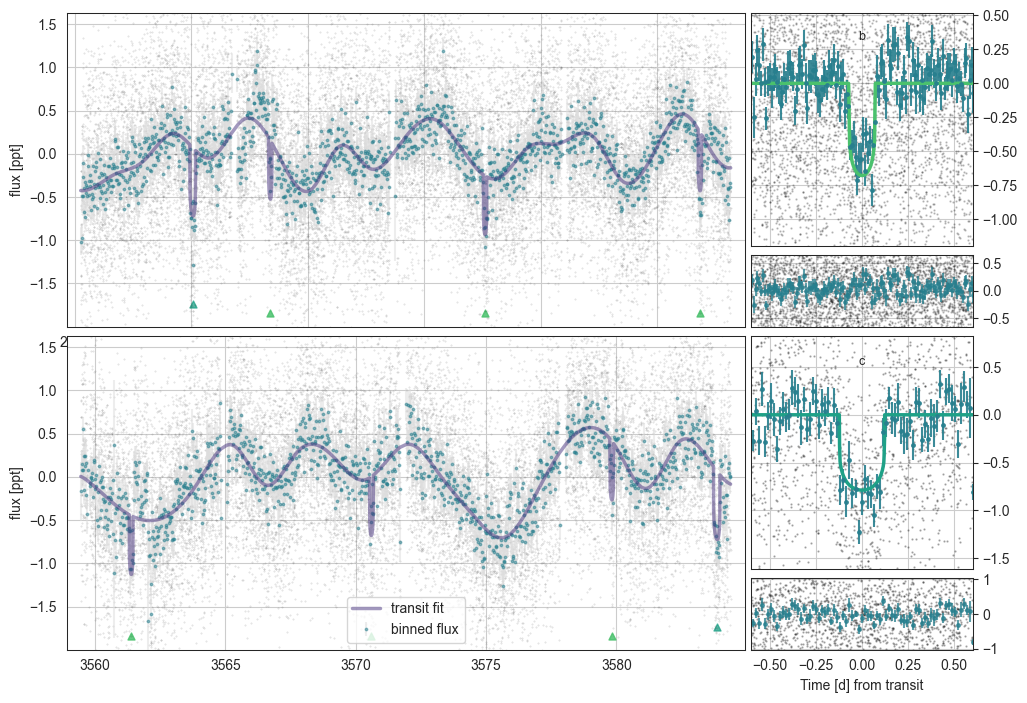
E1 - Plotting the intial duotransit fit
Options here:
plot_flat=Truesubtracts the spline fitylim=(-1.5,1.0)sets ylim on full timeseries plotxlim=(-0.3,0.3)sets xlim on folded plotssavepng=Falsedoes not save a png (default True)savepdf=Truesaves a pdf (default False)
[14]:
mod.plot(savepng=False)
initialising transit
Initalising Transit models for plotting with n_samp= 10
phase (5147,) masked_flux 5147 cad_mask 37141 36936 phasebool (37141,) 5183 transmod (5147,) othpls [0. 0. 0. ... 0. 0. 0.] (5147,)
(5147,) (5147,) (5147,) (5147,) (5147,)
phase (1680,) masked_flux 1680 cad_mask 37141 36936 phasebool (37141,) 1680 transmod (1680,) othpls [0. 0. 0. ... 0. 0. 0.] (1680,)
(1680,) (1680,) (1680,) (1680,) (1680,)
0.12964546154463585
0.20641507580074672
E1 - Sampling the duotransit model
The sampling can be modified in the following ways:
n_draws=1800is the number of (post-burn-in) samples per chainn_chains=6is the number of chainscores=6is the number of CPU cores to run on.sample_method=pm.NUTSallows for the ability to run pymc samplers
[15]:
mod.sample_model(n_draws=1000,n_chains=6,cores=6)
Multiprocess sampling (6 chains in 6 jobs)
NUTS: [Rs, rhostar, t0_b, per_b, logror_b, b_b, t0_c, logror_c, b_c, tdur_c, q_star_tess, log_jitter_ts_120]
Sampling 6 chains for 660 tune and 1_000 draw iterations (3_960 + 6_000 draws total) took 690 seconds.
Chain 0 reached the maximum tree depth. Increase `max_treedepth`, increase `target_accept` or reparameterize.
Chain 1 reached the maximum tree depth. Increase `max_treedepth`, increase `target_accept` or reparameterize.
Chain 2 reached the maximum tree depth. Increase `max_treedepth`, increase `target_accept` or reparameterize.
Chain 3 reached the maximum tree depth. Increase `max_treedepth`, increase `target_accept` or reparameterize.
Chain 4 reached the maximum tree depth. Increase `max_treedepth`, increase `target_accept` or reparameterize.
Chain 5 reached the maximum tree depth. Increase `max_treedepth`, increase `target_accept` or reparameterize.
The rhat statistic is larger than 1.01 for some parameters. This indicates problems during sampling. See https://arxiv.org/abs/1903.08008 for details
The effective sample size per chain is smaller than 100 for some parameters.  A higher number is needed for reliable rhat and ess computation. See https://arxiv.org/abs/1903.08008 for details
Saving sampled model parameters to file with shape: (21, 14)
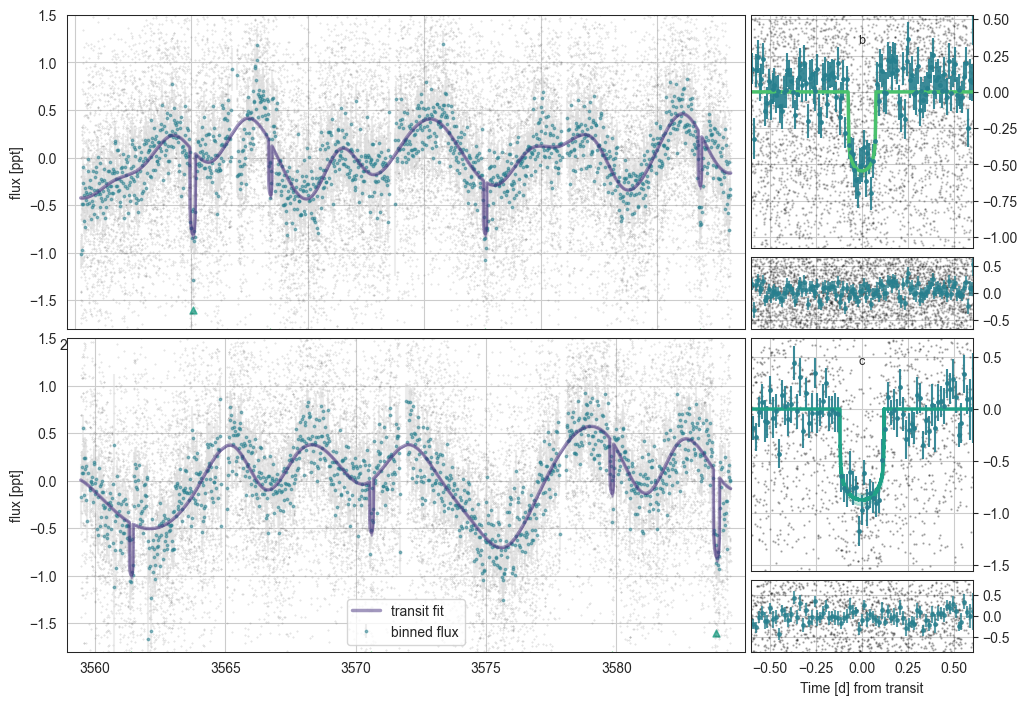
E1 - Plotting the outputs
The models are interpolated to the full input lightcurve and stored in mod.trans_to_plot and mod.gp_to_plot.
overwrite=True re-extracts these transit and spline models from the trace. plot_2sig=True plots both 1 and 2 sigma regions.
[17]:
mod.plot(overwrite=True, plot_2sig=False,ylim=(-1.8,1.5))
initialising transit
Initalising Transit models for plotting with n_samp= 990
phase (5148,) masked_flux 5148 cad_mask 37141 36936 phasebool (37141,) 5184 transmod (5148,) othpls [0. 0. 0. ... 0. 0. 0.] (5148,)
(5148,) (5148,) (5148,) (5148,) (5148,)
phase (1686,) masked_flux 1686 cad_mask 37141 36936 phasebool (37141,) 1686 transmod (1686,) othpls [0. 0. 0. ... 0. 0. 0.] (1686,)
(1686,) (1686,) (1686,) (1686,) (1686,)
0.13251834087207237
0.17088097275379405
[18]:
mod.plot_corner()
variables for Corner: ['Rs', 'rhostar', 'logror_b', 'b_b', 'tdur_b', 't0_b', 'logror_c', 'b_c', 'tdur_c', 't0_c']
['Rs', 'rhostar', 'logror_b', 'b_b', 'tdur_b', 't0_b', 'logror_c', 'b_c', 'tdur_c', 't0_c']
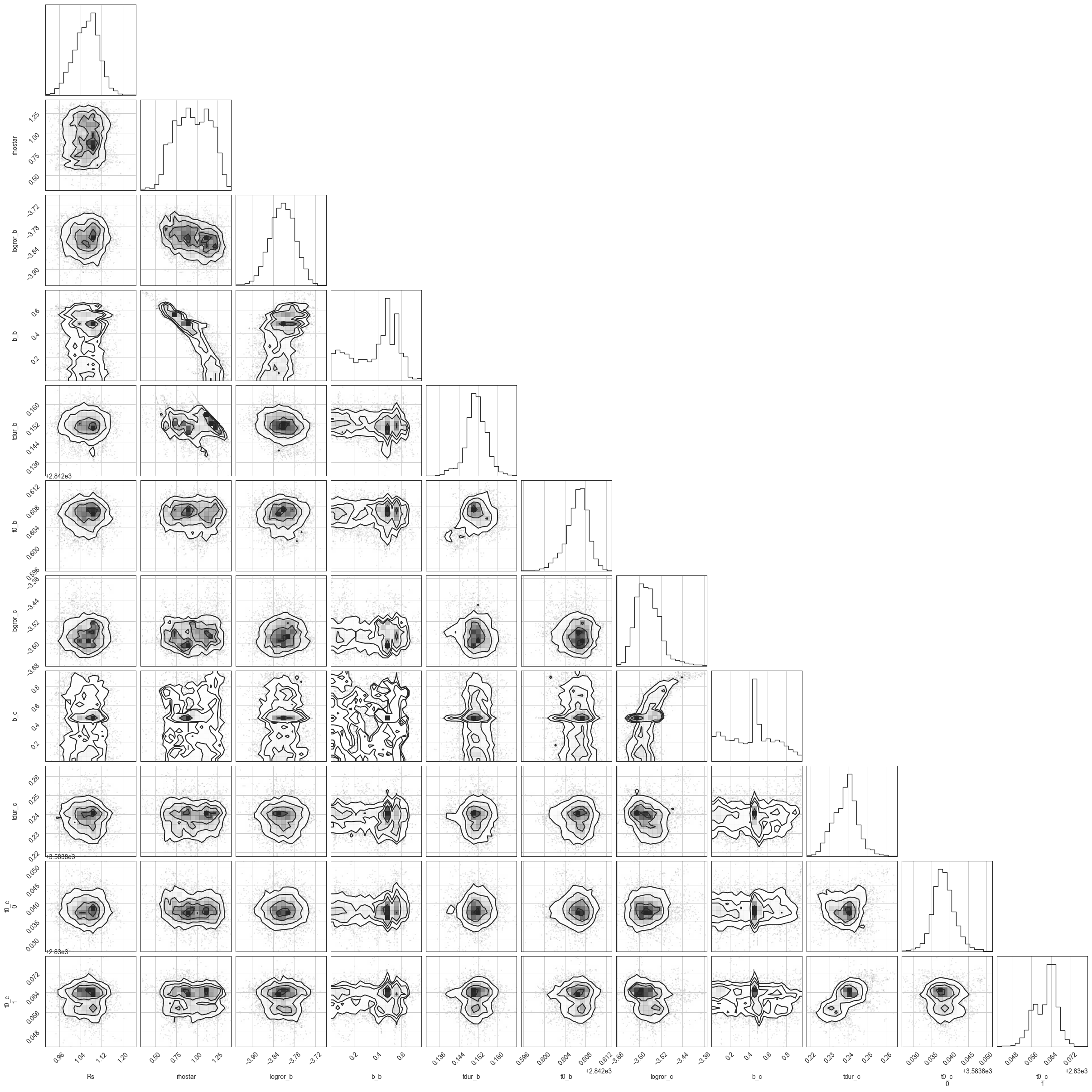
We need to run these models for longer (and potentially prune the b=0.5 outlier here).
E1 - Computing the period probabilities a posteriori
In this new version, we fit the transits in a way ambivalent to the periods, and instead only assess the period probabilities using the trace (and various priors). To do this, you have to call mod.assess_period_from_posterior()
At this point, key choices have to be made about the eccentricity prior by updating ecc_prior='auto'. This is extremely important, as the uncertainty in your derived period distribution depends highly on the eccentricity prior, so choose an option that you believe best matches your planet/planetary system. There are the following options:
ecc_prior='uniform'- Planets don’t have this distribution in reality. Don’t use this.ecc_prior='kipping'- The (close-in) Kipping 2013 prior. Derived from RV planets, and therefore dominated by high-mass planets. Potentially OK in those cases.ecc_prior='vaneylen'- Specifically the multi-planet version derived in VanEylen 2018. Measured for compact multi systems in Kepler. The most e=0-biased prior available (therefore, potentially, the best period logprob constraints)ecc_prior='bernmodel_sing'- Derived from single planets as produced by Bern model full-system simulations. No observational biases. The Bern Model priors are also all radius-dependent using the initial radius to choose one distribution from [terrestrials, Neptunians or Giants]. The giant case matcheskippingwell, while the smaller planets are much more low-eccentricity.ecc_prior='bernmodel_mult'- Derived from multi systems produced by Bern model. Radius-dependent (rocky, Neptunian & Giants). These, especially for small planets, are well-constrained to e~0 (though less so thanvaneylen).ecc_prior='bernmodel_both'- Derived from all (observable) planets as produced by Bern model full-system simulations.ecc_prior='auto'- The default is the (radius-constrained)bernmodel_bothprior for single cases (as we do not know if there could be additional planets), and thebernmodel_multin multi cases.
[29]:
mod.assess_period_from_posterior()
multis__bernmodel auto {'kipping': 'kip', 'vaneylen': 'vve', 'flat': 'flat', 'apogee': 'apo', 'bernmodel_both': 'both__bernmodel', 'bernmodel_sing': 'singles__bernmodel', 'bernmodel_mult': 'multis__bernmodel', 'auto': 'multis__bernmodel'} mult ['bern', 'auto']
E1 - Viewing the derived parameters
mod.make_table() creates (and saves) the posterior statistics. Check that ess is at least a thousand, and r_hat is well below 1.05 (ideally below 1.01).
[30]:
tab=mod.make_table()
tab.to_csv("TOI5968_TIC431810418_best_fit_data.csv")
tab.iloc[:25]
Saving sampled model parameters to file with shape: (328, 14)
[30]:
| mean | sd | hdi_3% | hdi_97% | mcse_mean | mcse_sd | ess_bulk | ess_tail | r_hat | 5% | -$1\sigma$ | median | +$1\sigma$ | 95% | |
|---|---|---|---|---|---|---|---|---|---|---|---|---|---|---|
| Rs | 1.06189 | 0.04634 | 0.97166 | 1.14453 | 0.00324 | 0.00229 | 221.82731 | 1076.29584 | 1.03780 | 0.98059 | 1.01383 | 1.06552 | 1.10589 | 1.13321 |
| rhostar | 0.94808 | 0.20533 | 0.60120 | 1.29347 | 0.05671 | 0.04103 | 14.06207 | 84.21169 | 1.35297 | 0.62333 | 0.72072 | 0.94833 | 1.17599 | 1.26266 |
| t0_b | 2842.60631 | 0.00213 | 2842.60199 | 2842.61013 | 0.00014 | 0.00010 | 285.45446 | 239.01105 | 1.01701 | 2842.60231 | 2842.60430 | 2842.60656 | 2842.60824 | 2842.60936 |
| per_b | 9.21519 | 0.00000 | 9.21518 | 9.21519 | 0.00000 | 0.00000 | 514.51917 | 907.03338 | 1.01120 | 9.21519 | 9.21519 | 9.21519 | 9.21519 | 9.21519 |
| logror_b | -3.81360 | 0.03562 | -3.88098 | -3.74818 | 0.00490 | 0.00349 | 53.82261 | 532.60427 | 1.08189 | -3.87322 | -3.84942 | -3.81321 | -3.77804 | -3.75564 |
| t0_c[0] | 3583.83830 | 0.00309 | 3583.83255 | 3583.84433 | 0.00016 | 0.00012 | 412.95200 | 405.44537 | 1.01348 | 3583.83351 | 3583.83553 | 3583.83813 | 3583.84120 | 3583.84356 |
| t0_c[1] | 2830.06183 | 0.00471 | 2830.05276 | 2830.06977 | 0.00046 | 0.00033 | 114.73809 | 462.41245 | 1.04549 | 2830.05368 | 2830.05659 | 2830.06294 | 2830.06604 | 2830.06843 |
| logror_c | -3.56762 | 0.04664 | -3.65003 | -3.48594 | 0.00828 | 0.00593 | 29.92106 | 137.17971 | 1.14933 | -3.63306 | -3.61136 | -3.57202 | -3.52643 | -3.48636 |
| tdur_c | 0.23838 | 0.00647 | 0.22511 | 0.24940 | 0.00057 | 0.00040 | 137.31682 | 355.47911 | 1.04165 | 0.22770 | 0.23171 | 0.23882 | 0.24407 | 0.24860 |
| log_jitter_ts_120 | -1.69956 | 0.20648 | -2.08548 | -1.37996 | 0.01504 | 0.01126 | 287.80270 | 222.07193 | 1.02313 | -2.07737 | -1.86880 | -1.66404 | -1.51849 | -1.44411 |
| b_b | 0.37342 | 0.18647 | 0.03218 | 0.62246 | 0.05572 | 0.04047 | 11.59547 | 37.75428 | 1.46231 | 0.04395 | 0.12448 | 0.43173 | 0.55124 | 0.61739 |
| b_c | 0.43211 | 0.24236 | 0.00245 | 0.82399 | 0.03544 | 0.02522 | 41.83083 | 112.67290 | 1.34701 | 0.04657 | 0.13563 | 0.45777 | 0.70297 | 0.84076 |
| q_star_tess[0] | 0.25822 | 0.11404 | 0.08609 | 0.44822 | 0.03049 | 0.02203 | 15.62891 | 45.80557 | 1.29616 | 0.09516 | 0.10801 | 0.26694 | 0.37700 | 0.43494 |
| q_star_tess[1] | 0.31133 | 0.08084 | 0.15013 | 0.45902 | 0.00759 | 0.00538 | 98.04540 | 268.07579 | 1.06967 | 0.17087 | 0.22746 | 0.31646 | 0.38585 | 0.43959 |
| ror_b | 0.02208 | 0.00078 | 0.02063 | 0.02356 | 0.00011 | 0.00008 | 53.82261 | 532.60427 | 1.08189 | 0.02079 | 0.02129 | 0.02208 | 0.02287 | 0.02339 |
| rpl_b | 2.56080 | 0.14648 | 2.29119 | 2.82569 | 0.01248 | 0.00885 | 141.23675 | 839.90987 | 1.06038 | 2.32404 | 2.41444 | 2.55604 | 2.71575 | 2.79701 |
| ror_c | 0.02825 | 0.00135 | 0.02598 | 0.03062 | 0.00024 | 0.00017 | 29.92106 | 137.17971 | 1.14933 | 0.02644 | 0.02702 | 0.02810 | 0.02941 | 0.03061 |
| rpl_c | 3.27645 | 0.21393 | 2.88626 | 3.67140 | 0.03327 | 0.02369 | 40.57589 | 490.06167 | 1.10783 | 2.95276 | 3.07038 | 3.25759 | 3.49000 | 3.63663 |
| u_star_tess[0] | 0.30612 | 0.10903 | 0.13735 | 0.52392 | 0.02122 | 0.01517 | 27.14605 | 177.41133 | 1.17004 | 0.15056 | 0.19896 | 0.29476 | 0.42089 | 0.49796 |
| u_star_tess[1] | 0.18736 | 0.09888 | 0.01520 | 0.37797 | 0.01780 | 0.01271 | 31.48817 | 279.15544 | 1.14207 | 0.04883 | 0.09800 | 0.16650 | 0.28974 | 0.36947 |
| tdur_b | 0.15111 | 0.00436 | 0.14202 | 0.15958 | 0.00043 | 0.00031 | 120.46246 | 108.80107 | 1.04323 | 0.14332 | 0.14744 | 0.15112 | 0.15523 | 0.15803 |
| pcirc_c | 0.00000 | 0.00000 | 0.00000 | 0.00000 | 0.00000 | 0.00000 | 45.60024 | 129.94365 | 1.33323 | 0.00000 | 0.00000 | 0.00000 | 0.00000 | 0.00000 |
| per_c[0] | 753.77647 | 0.00575 | 753.76722 | 753.78792 | 0.00053 | 0.00038 | 114.17134 | 447.75035 | 1.04615 | 753.76834 | 753.77111 | 753.77585 | 753.78231 | 753.78672 |
| per_c[1] | 376.88824 | 0.00287 | 376.88361 | 376.89396 | 0.00027 | 0.00019 | 114.17134 | 447.75035 | 1.04615 | 376.88417 | 376.88556 | 376.88793 | 376.89115 | 376.89336 |
| per_c[2] | 251.25882 | 0.00192 | 251.25574 | 251.26264 | 0.00018 | 0.00013 | 114.17134 | 447.75035 | 1.04615 | 251.25611 | 251.25704 | 251.25862 | 251.26077 | 251.26224 |
E1 - Plotting the orbital period posterior probability distribution
This is, in many ways, the key figure. What is the most likely orbital period?
Options: ymin=-4, pmin=23, pmax=300, etc.
[32]:
mod.plot_periods(ymin=-4)
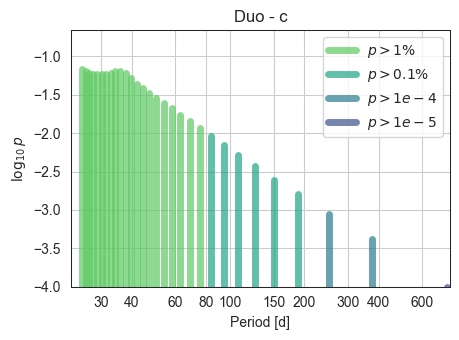
The general decreasing trend is due to the various priors (geometric, etc) which prefer short periods. The “bump” here is likely due to the circular/low eccentricity regime peaking around this value. A more constraining eccentricity prior may change the result…
E1 - Saving the duotranist model
[33]:
mod.save_model_to_file()
E1 - Predicting upcoming transits for all aliases
Using mod.predict_future_transits()
We can specify a time range using
time_startandtime_endviaastropy.time.Timeobjects (time_end=Time("2026-01-01T00:00:00.0",format='isot')), or usetime_dur=500to ask for a prediction 500 days into the future.We can check which transits are TESS observed using
check_TESS=True(default)We can use
compute_solsys_dist=Trueto compute sun and moon distances (CHEOPS observations are possible whensun_dist>117andmoon_dist>15).
[35]:
trans=mod.predict_future_transits(time_dur=500)
trans.to_csv("TOI5968_TIC431810418_trans_table.csv")
time range 2025-06-05T15:50:38.491 -> 2026-10-18T15:50:38.492
[36]:
trans
[36]:
| transit_mid_date | transit_mid_med | transit_dur_med | transit_dur_-1sig | transit_dur_+1sig | transit_start_+2sig | transit_start_+1sig | transit_start_med | transit_start_-1sig | transit_start_-2sig | ... | planet_name | alias_n | alias_p | aliases_ns | aliases_ps | total_prob | num_aliases | in_TESS | sun_separation | moon_separation | |
|---|---|---|---|---|---|---|---|---|---|---|---|---|---|---|---|---|---|---|---|---|---|
| 0 | 2025-06-11T08:19:46.470 | 3837.847066 | 0.151122 | 0.147437 | 0.155233 | 3837.780293 | 3837.775057 | 3837.771504 | 3837.767152 | 3837.761926 | ... | multi_b | 0 | 9.21519 | 0 | 9.2152 | 1.0 | 1.0 | False | 78.389208 | 104.101889 |
| 1 | 2025-06-20T13:29:38.506 | 3847.062251 | 0.151122 | 0.147437 | 0.155233 | 3846.995484 | 3846.990248 | 3846.986690 | 3846.982342 | 3846.977116 | ... | multi_b | 0 | 9.21519 | 0 | 9.2152 | 1.0 | 1.0 | False | 85.759439 | 34.597295 |
| 2 | 2025-06-29T18:39:30.858 | 3856.277440 | 0.151122 | 0.147437 | 0.155233 | 3856.210674 | 3856.205440 | 3856.201879 | 3856.197533 | 3856.192305 | ... | multi_b | 0 | 9.21519 | 0 | 9.2152 | 1.0 | 1.0 | False | 93.154198 | 135.076334 |
| 3 | 2025-07-08T23:49:23.402 | 3865.492632 | 0.151122 | 0.147437 | 0.155233 | 3865.425865 | 3865.420632 | 3865.417071 | 3865.412723 | 3865.407495 | ... | multi_b | 0 | 9.21519 | 0 | 9.2152 | 1.0 | 1.0 | False | 100.520485 | 100.490479 |
| 4 | 2025-07-18T04:59:15.844 | 3874.707822 | 0.151122 | 0.147437 | 0.155233 | 3874.641056 | 3874.635824 | 3874.632261 | 3874.627914 | 3874.622685 | ... | multi_b | 0 | 9.21519 | 0 | 9.2152 | 1.0 | 1.0 | False | 107.811175 | 36.950328 |
| 5 | 2025-07-27T10:09:08.164 | 3883.923011 | 0.151122 | 0.147437 | 0.155233 | 3883.856244 | 3883.851016 | 3883.847450 | 3883.843103 | 3883.837874 | ... | multi_b | 0 | 9.21519 | 0 | 9.2152 | 1.0 | 1.0 | False | 114.972771 | 137.466355 |
| 6 | 2025-08-05T15:19:00.702 | 3893.138203 | 0.151122 | 0.147437 | 0.155233 | 3893.071435 | 3893.066207 | 3893.062641 | 3893.058292 | 3893.053062 | ... | multi_b | 0 | 9.21519 | 0 | 9.2152 | 1.0 | 1.0 | False | 121.918730 | 97.328477 |
| 7 | 2025-08-14T20:28:53.184 | 3902.353393 | 0.151122 | 0.147437 | 0.155233 | 3902.286626 | 3902.281398 | 3902.277832 | 3902.273482 | 3902.268249 | ... | multi_b | 0 | 9.21519 | 0 | 9.2152 | 1.0 | 1.0 | False | 128.531425 | 40.122646 |
| 8 | 2025-08-24T01:38:45.491 | 3911.568582 | 0.151122 | 0.147437 | 0.155233 | 3911.501817 | 3911.496588 | 3911.493021 | 3911.488671 | 3911.483437 | ... | multi_b | 0 | 9.21519 | 0 | 9.2152 | 1.0 | 1.0 | False | 134.641085 | 139.822349 |
| 9 | 2025-09-02T06:48:37.888 | 3920.783772 | 0.151122 | 0.147437 | 0.155233 | 3920.717004 | 3920.711777 | 3920.708211 | 3920.703860 | 3920.698624 | ... | multi_b | 0 | 9.21519 | 0 | 9.2152 | 1.0 | 1.0 | False | 139.976969 | 94.383946 |
| 10 | 2025-09-11T11:58:30.314 | 3929.998962 | 0.151122 | 0.147437 | 0.155233 | 3929.932193 | 3929.926968 | 3929.923401 | 3929.919051 | 3929.913812 | ... | multi_b | 0 | 9.21519 | 0 | 9.2152 | 1.0 | 1.0 | False | 144.153345 | 43.525182 |
| 11 | 2025-09-20T17:08:22.687 | 3939.214151 | 0.151122 | 0.147437 | 0.155233 | 3939.147384 | 3939.142158 | 3939.138590 | 3939.134243 | 3939.128999 | ... | multi_b | 0 | 9.21519 | 0 | 9.2152 | 1.0 | 1.0 | False | 146.697717 | 142.279675 |
| 12 | 2025-09-29T22:18:15.108 | 3948.429342 | 0.151122 | 0.147437 | 0.155233 | 3948.362575 | 3948.357348 | 3948.353780 | 3948.349433 | 3948.344186 | ... | multi_b | 0 | 9.21519 | 0 | 9.2152 | 1.0 | 1.0 | False | 147.187220 | 91.238089 |
| 13 | 2025-10-09T03:28:07.458 | 3957.644531 | 0.151122 | 0.147437 | 0.155233 | 3957.577766 | 3957.572539 | 3957.568970 | 3957.564624 | 3957.559374 | ... | multi_b | 0 | 9.21519 | 0 | 9.2152 | 1.0 | 1.0 | False | 145.501102 | 46.468435 |
| 14 | 2025-10-18T08:37:59.837 | 3966.859720 | 0.151122 | 0.147437 | 0.155233 | 3966.792957 | 3966.787729 | 3966.784159 | 3966.779815 | 3966.774561 | ... | multi_b | 0 | 9.21519 | 0 | 9.2152 | 1.0 | 1.0 | False | 141.900768 | 144.723997 |
| 15 | 2025-10-27T13:47:52.173 | 3976.074909 | 0.151122 | 0.147437 | 0.155233 | 3976.008148 | 3976.002920 | 3975.999348 | 3975.995005 | 3975.989748 | ... | multi_b | 0 | 9.21519 | 0 | 9.2152 | 1.0 | 1.0 | False | 136.841509 | 87.560533 |
| 16 | 2025-11-05T18:57:44.634 | 3985.290100 | 0.151122 | 0.147437 | 0.155233 | 3985.223339 | 3985.218112 | 3985.214539 | 3985.210194 | 3985.204936 | ... | multi_b | 0 | 9.21519 | 0 | 9.2152 | 1.0 | 1.0 | False | 130.763292 | 48.660160 |
| 17 | 2025-11-15T00:07:37.039 | 3994.505290 | 0.151122 | 0.147437 | 0.155233 | 3994.438530 | 3994.433303 | 3994.429729 | 3994.425379 | 3994.420124 | ... | multi_b | 0 | 9.21519 | 0 | 9.2152 | 1.0 | 1.0 | False | 123.992418 | 146.854374 |
| 18 | 2025-11-24T05:17:29.423 | 4003.720479 | 0.151122 | 0.147437 | 0.155233 | 4003.653719 | 4003.648495 | 4003.644918 | 4003.640570 | 4003.635313 | ... | multi_b | 0 | 9.21519 | 0 | 9.2152 | 1.0 | 1.0 | False | 116.752230 | 83.368881 |
| 19 | 2025-12-03T10:27:21.702 | 4012.935668 | 0.151122 | 0.147437 | 0.155233 | 4012.868909 | 4012.863685 | 4012.860107 | 4012.855758 | 4012.850502 | ... | multi_b | 0 | 9.21519 | 0 | 9.2152 | 1.0 | 1.0 | False | 109.204775 | 50.551928 |
| 20 | 2025-12-12T15:37:14.097 | 4022.150858 | 0.151122 | 0.147437 | 0.155233 | 4022.084098 | 4022.078876 | 4022.075296 | 4022.070946 | 4022.065691 | ... | multi_b | 0 | 9.21519 | 0 | 9.2152 | 1.0 | 1.0 | False | 101.461238 | 148.399419 |
| 21 | 2025-12-21T20:47:06.625 | 4031.366049 | 0.151122 | 0.147437 | 0.155233 | 4031.299290 | 4031.294066 | 4031.290488 | 4031.286134 | 4031.280879 | ... | multi_b | 0 | 9.21519 | 0 | 9.2152 | 1.0 | 1.0 | False | 93.601817 | 79.058327 |
| 22 | 2025-12-31T01:56:59.091 | 4040.581239 | 0.151122 | 0.147437 | 0.155233 | 4040.514482 | 4040.509258 | 4040.505678 | 4040.501321 | 4040.496068 | ... | multi_b | 0 | 9.21519 | 0 | 9.2152 | 1.0 | 1.0 | False | 85.705442 | 53.063147 |
| 23 | 2026-01-09T07:06:51.705 | 4049.796432 | 0.151122 | 0.147437 | 0.155233 | 4049.729675 | 4049.724448 | 4049.720871 | 4049.716509 | 4049.711256 | ... | multi_b | 0 | 9.21519 | 0 | 9.2152 | 1.0 | 1.0 | False | 77.843998 | 149.295272 |
| 24 | 2026-01-18T12:16:44.218 | 4059.011623 | 0.151122 | 0.147437 | 0.155233 | 4058.944868 | 4058.939639 | 4058.936062 | 4058.931699 | 4058.926445 | ... | multi_b | 0 | 9.21519 | 0 | 9.2152 | 1.0 | 1.0 | False | 70.085340 | 75.140034 |
| 25 | 2026-01-27T17:26:36.638 | 4068.226813 | 0.151122 | 0.147437 | 0.155233 | 4068.160059 | 4068.154829 | 4068.151252 | 4068.146889 | 4068.141633 | ... | multi_b | 0 | 9.21519 | 0 | 9.2152 | 1.0 | 1.0 | False | 62.523603 | 56.784796 |
| 26 | 2026-02-05T22:36:28.892 | 4077.442001 | 0.151122 | 0.147437 | 0.155233 | 4077.375249 | 4077.370020 | 4077.366440 | 4077.362079 | 4077.356821 | ... | multi_b | 0 | 9.21519 | 0 | 9.2152 | 1.0 | 1.0 | False | 55.282020 | 149.644375 |
| 27 | 2026-02-15T03:46:21.284 | 4086.657191 | 0.151122 | 0.147437 | 0.155233 | 4086.590437 | 4086.585209 | 4086.581630 | 4086.577269 | 4086.572010 | ... | multi_b | 0 | 9.21519 | 0 | 9.2152 | 1.0 | 1.0 | False | 48.521447 | 71.851359 |
| 28 | 2026-02-24T08:56:13.858 | 4095.872383 | 0.151122 | 0.147437 | 0.155233 | 4095.805630 | 4095.800397 | 4095.796821 | 4095.792458 | 4095.787198 | ... | multi_b | 0 | 9.21519 | 0 | 9.2152 | 1.0 | 1.0 | False | 42.488808 | 61.482701 |
| 29 | 2026-03-05T14:06:06.354 | 4105.087574 | 0.151122 | 0.147437 | 0.155233 | 4105.020820 | 4105.015587 | 4105.012012 | 4105.007650 | 4105.002386 | ... | multi_b | 0 | 9.21519 | 0 | 9.2152 | 1.0 | 1.0 | False | 37.542999 | 149.539845 |
| 30 | 2026-03-14T19:15:58.860 | 4114.302765 | 0.151122 | 0.147437 | 0.155233 | 4114.236008 | 4114.230775 | 4114.227203 | 4114.222837 | 4114.217575 | ... | multi_b | 0 | 9.21519 | 0 | 9.2152 | 1.0 | 1.0 | False | 34.141145 | 68.964285 |
| 31 | 2026-03-24T00:25:51.370 | 4123.517956 | 0.151122 | 0.147437 | 0.155233 | 4123.451198 | 4123.445966 | 4123.442394 | 4123.438024 | 4123.432763 | ... | multi_b | 0 | 9.21519 | 0 | 9.2152 | 1.0 | 1.0 | False | 32.745840 | 66.343913 |
| 32 | 2026-04-02T05:35:43.694 | 4132.733145 | 0.151122 | 0.147437 | 0.155233 | 4132.666384 | 4132.661157 | 4132.657583 | 4132.653216 | 4132.647952 | ... | multi_b | 0 | 9.21519 | 0 | 9.2152 | 1.0 | 1.0 | False | 33.579042 | 148.949546 |
| 33 | 2026-04-11T10:45:35.966 | 4141.948333 | 0.151122 | 0.147437 | 0.155233 | 4141.881570 | 4141.876347 | 4141.872772 | 4141.868404 | 4141.863140 | ... | multi_b | 0 | 9.21519 | 0 | 9.2152 | 1.0 | 1.0 | False | 36.452822 | 65.990259 |
| 34 | 2026-04-20T15:55:28.445 | 4151.163524 | 0.151122 | 0.147437 | 0.155233 | 4151.096757 | 4151.091539 | 4151.087962 | 4151.083592 | 4151.078328 | ... | multi_b | 0 | 9.21519 | 0 | 9.2152 | 1.0 | 1.0 | False | 40.908742 | 70.567271 |
| 35 | 2026-04-29T21:05:20.778 | 4160.378713 | 0.151122 | 0.147437 | 0.155233 | 4160.311944 | 4160.306729 | 4160.303152 | 4160.298783 | 4160.293517 | ... | multi_b | 0 | 9.21519 | 0 | 9.2152 | 1.0 | 1.0 | False | 46.459726 | 147.755239 |
| 36 | 2026-05-09T02:15:13.220 | 4169.593903 | 0.151122 | 0.147437 | 0.155233 | 4169.527135 | 4169.521917 | 4169.518342 | 4169.513973 | 4169.508707 | ... | multi_b | 0 | 9.21519 | 0 | 9.2152 | 1.0 | 1.0 | False | 52.730616 | 62.564579 |
| 37 | 2026-05-18T07:25:05.605 | 4178.809093 | 0.151122 | 0.147437 | 0.155233 | 4178.742326 | 4178.737105 | 4178.733531 | 4178.729161 | 4178.723896 | ... | multi_b | 0 | 9.21519 | 0 | 9.2152 | 1.0 | 1.0 | False | 59.471033 | 73.833005 |
| 38 | 2026-05-27T12:34:57.914 | 4188.024281 | 0.151122 | 0.147437 | 0.155233 | 4187.957518 | 4187.952295 | 4187.948720 | 4187.944353 | 4187.939085 | ... | multi_b | 0 | 9.21519 | 0 | 9.2152 | 1.0 | 1.0 | False | 66.508624 | 145.939190 |
| 39 | 2026-06-05T17:44:50.358 | 4197.239472 | 0.151122 | 0.147437 | 0.155233 | 4197.172708 | 4197.167486 | 4197.163911 | 4197.159543 | 4197.154275 | ... | multi_b | 0 | 9.21519 | 0 | 9.2152 | 1.0 | 1.0 | False | 73.729766 | 58.658971 |
| 40 | 2026-06-14T22:54:42.695 | 4206.454661 | 0.151122 | 0.147437 | 0.155233 | 4206.387898 | 4206.382675 | 4206.379100 | 4206.374732 | 4206.369464 | ... | multi_b | 0 | 9.21519 | 0 | 9.2152 | 1.0 | 1.0 | False | 81.063686 | 76.466514 |
| 41 | 2026-06-24T04:04:35.128 | 4215.669851 | 0.151122 | 0.147437 | 0.155233 | 4215.603090 | 4215.597863 | 4215.594290 | 4215.589921 | 4215.584653 | ... | multi_b | 0 | 9.21519 | 0 | 9.2152 | 1.0 | 1.0 | False | 88.449773 | 143.692978 |
| 42 | 2026-07-03T09:14:27.499 | 4224.885040 | 0.151122 | 0.147437 | 0.155233 | 4224.818285 | 4224.813054 | 4224.809479 | 4224.805110 | 4224.799842 | ... | multi_b | 0 | 9.21519 | 0 | 9.2152 | 1.0 | 1.0 | False | 95.835653 | 54.544327 |
| 43 | 2026-07-12T14:24:19.704 | 4234.100228 | 0.151122 | 0.147437 | 0.155233 | 4234.033479 | 4234.028247 | 4234.024667 | 4234.020299 | 4234.015030 | ... | multi_b | 0 | 9.21519 | 0 | 9.2152 | 1.0 | 1.0 | False | 103.181785 | 79.205636 |
| 44 | 2026-07-21T19:34:12.109 | 4243.315418 | 0.151122 | 0.147437 | 0.155233 | 4243.248670 | 4243.243437 | 4243.239857 | 4243.235488 | 4243.230219 | ... | multi_b | 0 | 9.21519 | 0 | 9.2152 | 1.0 | 1.0 | False | 110.436012 | 141.298358 |
| 45 | 2026-07-31T00:44:04.425 | 4252.530607 | 0.151122 | 0.147437 | 0.155233 | 4252.463861 | 4252.458627 | 4252.455046 | 4252.450677 | 4252.445407 | ... | multi_b | 0 | 9.21519 | 0 | 9.2152 | 1.0 | 1.0 | False | 117.526594 | 50.624329 |
| 46 | 2026-08-09T05:53:56.740 | 4261.745796 | 0.151122 | 0.147437 | 0.155233 | 4261.679052 | 4261.673818 | 4261.670234 | 4261.665866 | 4261.660596 | ... | multi_b | 0 | 9.21519 | 0 | 9.2152 | 1.0 | 1.0 | False | 124.367474 | 82.728558 |
| 47 | 2026-08-18T11:03:49.252 | 4270.960987 | 0.151122 | 0.147437 | 0.155233 | 4270.894243 | 4270.889009 | 4270.885426 | 4270.881056 | 4270.875785 | ... | multi_b | 0 | 9.21519 | 0 | 9.2152 | 1.0 | 1.0 | False | 130.825027 | 138.923806 |
| 48 | 2026-08-27T16:13:41.621 | 4280.176176 | 0.151122 | 0.147437 | 0.155233 | 4280.109434 | 4280.104201 | 4280.100615 | 4280.096245 | 4280.090974 | ... | multi_b | 0 | 9.21519 | 0 | 9.2152 | 1.0 | 1.0 | False | 136.687632 | 47.234343 |
| 49 | 2026-09-05T21:23:34.272 | 4289.391369 | 0.151122 | 0.147437 | 0.155233 | 4289.324624 | 4289.319390 | 4289.315808 | 4289.311433 | 4289.306163 | ... | multi_b | 0 | 9.21519 | 0 | 9.2152 | 1.0 | 1.0 | False | 141.651812 | 87.266055 |
| 50 | 2026-09-15T02:33:26.784 | 4298.606560 | 0.151122 | 0.147437 | 0.155233 | 4298.539814 | 4298.534580 | 4298.530999 | 4298.526622 | 4298.521350 | ... | multi_b | 0 | 9.21519 | 0 | 9.2152 | 1.0 | 1.0 | False | 145.294235 | 136.520918 |
| 51 | 2026-09-24T07:43:18.986 | 4307.821748 | 0.151122 | 0.147437 | 0.155233 | 4307.755004 | 4307.749772 | 4307.746186 | 4307.741811 | 4307.736538 | ... | multi_b | 0 | 9.21519 | 0 | 9.2152 | 1.0 | 1.0 | False | 147.128490 | 44.460905 |
| 52 | 2026-10-03T12:53:11.405 | 4317.036938 | 0.151122 | 0.147437 | 0.155233 | 4316.970196 | 4316.964962 | 4316.961376 | 4316.957000 | 4316.951727 | ... | multi_b | 0 | 9.21519 | 0 | 9.2152 | 1.0 | 1.0 | False | 146.819383 | 92.487169 |
| 53 | 2026-10-12T18:03:03.884 | 4326.252128 | 0.151122 | 0.147437 | 0.155233 | 4326.185388 | 4326.180150 | 4326.176567 | 4326.172188 | 4326.166920 | ... | multi_b | 0 | 9.21519 | 0 | 9.2152 | 1.0 | 1.0 | False | 144.390519 | 133.878554 |
54 rows × 30 columns
[ ]:
# Pre-initialisation step (for me) to run before the rest of the notebook
# The followg may need to be MonoTools.MonoTools if you are outside the MonoTools folder when importing:
import os
os.environ['MONOTOOLSPATH']='/Users/hugh/Postdoc/Cheops/Duotransits'
import pytensor
pytensor.config.gcc__cxxflags = '-fbracket-depth=512'
%load_ext autoreload
%autoreload 2